Automating Social Media Campaign Reporting

TIMELINESept 2024 - Dec 2024
ROLEFullstack Developer
TECH STACKNextjs, Tailwind CSS, FastAPI, MongoDB
SKILLSFrontend & Backend Development
OVERVIEW
Rebuilding a campaign analytics platform
At Twospoon, I was asked to rebuild a social listening analytics dashboard end-to-end, transitioning from a manual developer-dependent workflow to an automated self-serve product for a marketing agency.
THE PROBLEM
A multi-hour, manual reporting process
The client, a marketing agency managing Instagram pages for brands and responsible for running campaigns, relied on a manual reporting process.
When they needed campaign reports to show to the brands, they would provide the campaign's post links to a developer in our team, who had to run Python scripts to get a few metrics and then manually enter the values into the frontend by cloning static pages for each campaign.
This took around 2-4 hours of turnaround time for each campaign, the developer could not handle simultaneous requests and this way of working was not scalable.
THE SOLUTION
A pipeline that processes campaigns in minutes, not hours
The solution was quite obvious - automate the entire workflow and build a dashboard where the client can create campaign reports themselves, which would reduce the turnaround time as well as remove the need for developer involvement.
So, I started mapping out the things that were already there and the pieces that were missing to make the platform automated.
Things that were already there:
- Scripts to fetch post details and comments from APIs
- Scripts to send the comments' data to OpenAI for sentiment analysis, language labelling, emotion detection and to Claude for topic modelling
- A static frontend to display the results (but had to be created manually for each campaign by cloning static pages and entering the values)
Missing pieces:
- Admin dashboard for the clients to create campaigns themselves
- Processing pipeline to run the scripts in order and store the results in the database
- Dynamic frontend to display the processed data based on the campaign being viewed
 Visual respentation of the flow
DEVELOPMENT PROCESS
Building the platform without breaking the existing workflow
The key technical decision was to build the new system so that it still works with the existing data. So, these were some of the technical decisions I made to achieve that:
Admin Dashboard
- Next.js 14 with App Router
- TailwindCSS for styling
- shadcn/ui for components and charts
- Supabase for authentication
Admin Dashboard was built relatively simple with minimal styling. The client has to login and then create a campaign by filling out a form with campaign's metadata and the campaign's post links. The form submission triggers the backend processing pipeline and the client can see the processing status in the dashboard.
The home page shows the various dashboards that the client has created. Clicking on a dashboard shows its page with a few statistics like the number of views, last refreshed time, buttons to view, refresh and delete the dashboard.
Backend
- FastAPI and Uvicorn
- MongoDB as database
- Openai and Claude for AI analytics
- RapidAPI, Youtube Data API for post and comment data of Instagram. Twitter and Youtube posts
- Supabase JWT for authentication
I chose to keep the core processing scripts as they were, including the MongoDB database and decided to wrap them in a pipeline with FastAPI backend, implementing the API endpoints for both the admin and the client dashboard and adding other supporting functionalities.
Built the processing pipeline to be asynchronous so that it can handle multiple campaign dashboard requests and made the backend more robust by adding fallback API providers, exponential backoff for rate limits, retry mechanisms for AI calls and proper logging to monitor the processing.
Client Dashboard
- Next.js 14 with App Router
- TailwindCSS for styling
- shadcn/ui for components and charts
The client dashboard that was already there worked by cloning an existing page, changing the metadata and numbers for each new campaign. It was also visually old and the UX was quite janky.
I rebuilt it to into a dynamic dashboard that fetches the campaign data based on the URL and displays the metrics and visualizations accordingly. I also used shadcn/ui components and charts (with slight modifications) to improve the UI and added loading states and caching to improve the overall UX.
CHALLENGES
Handling one-off requests
As the client was expanding their services to different brand types, they had more ad-hoc requests for new visualizations and metrics specific to single campaigns. Since I built the system to be modular and flexible, I was able to handle these requests without breaking the existing system by building new components that render conditionally based on the campaign being viewed.
Here are some of the charts and metrics built for specific requests:
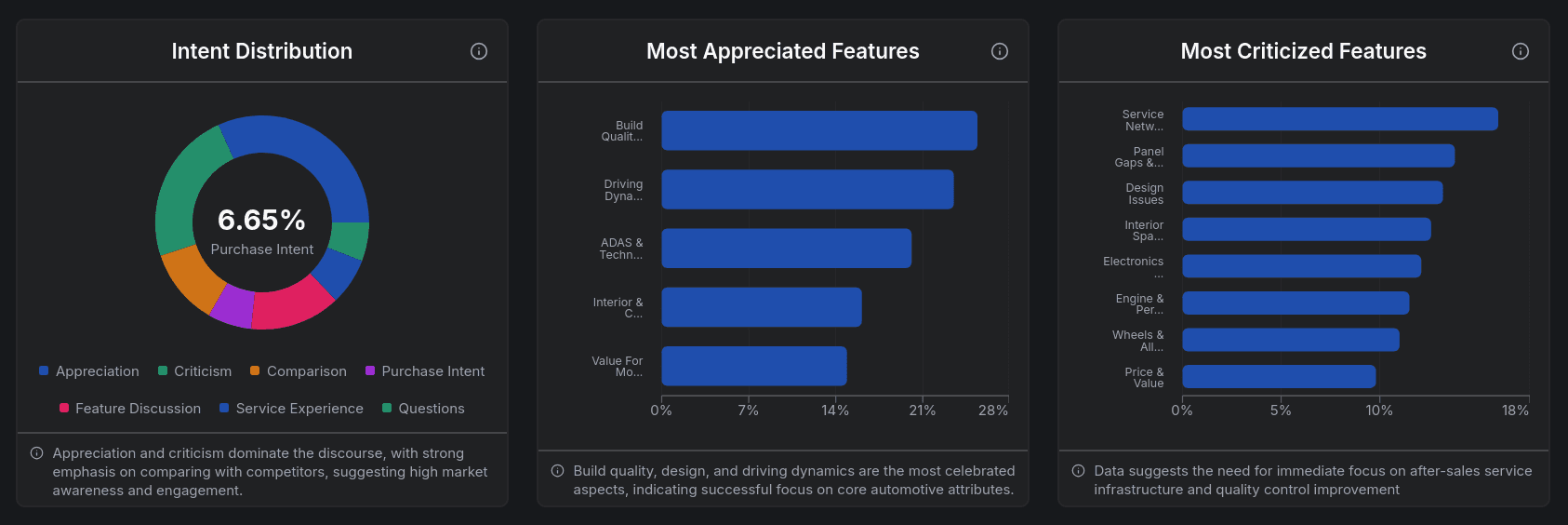 Custom charts for a car brand
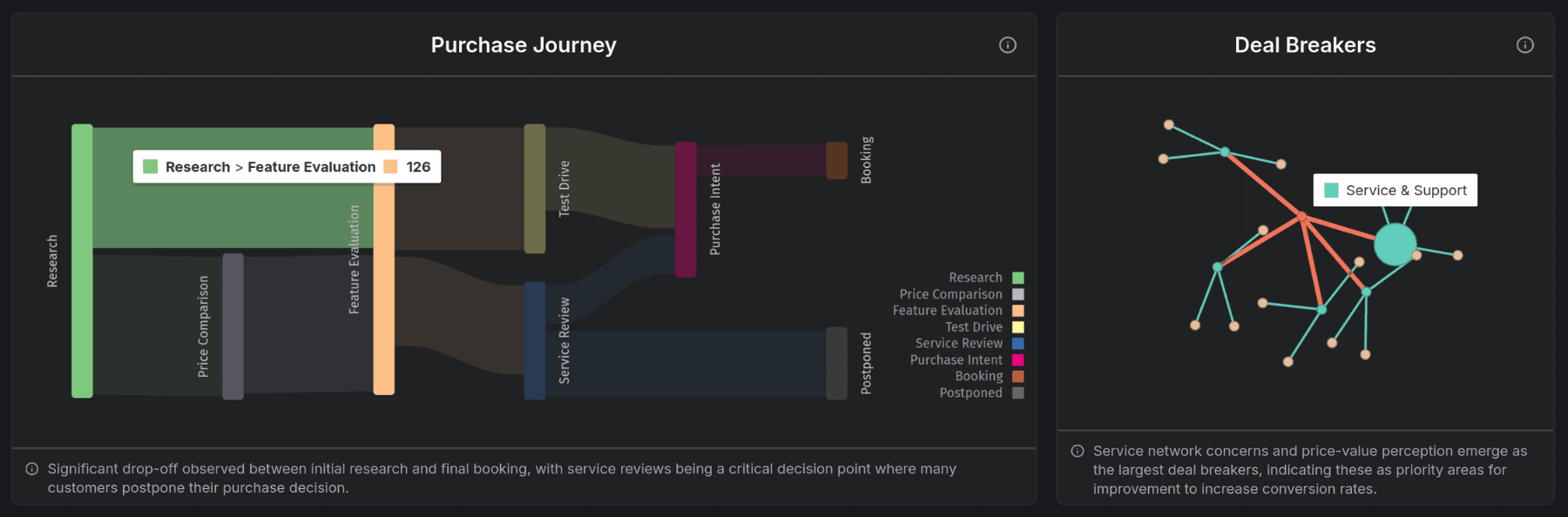 Custom charts for a car brand
 Custom visualizations for a podcaster
IMPACT
From hours to minutes
This complete change in workflow reduced the turnaround time for a campaign report from around 2-4 hours to a few minutes. The new system can also handle multiple campaign requests simultaneously, which was not possible before.
A campaign with around 30 posts, averaging about 500 comments per post, now took less than 5 minutes to process, whereas before a developer spent about an hour and the company promised a 2-4 hour window (processing time varies based on post virality due to API rate limits when fetching large comment volumes).
The client can now create campaigns independently without developer involvement. The automated workflow made their reporting process much quicker and they were able to show the results to the brands much faster.
REFLECTION
First project as a software developer
- Working on both the frontend and backend gave me a good understanding of how a complete product is built and how different parts of a system work together.
- I learned a lot about building robust systems that can handle real-world scenarios. This project increased my confidence levels so much, as I had to handle almost all the work as a solo developer.
- It was so rewarding to see the impact of my work on the client's workflow and how it made their process simpler and faster. This sparked my interest in building products that solve real-world problems and have a tangible impact on users.